
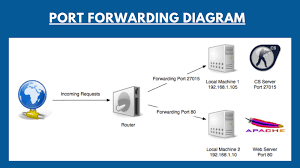
In today’s digital age, maintaining a secure and efficient network is crucial for both individuals and businesses. One of the key steps in ensuring that your network is properly configured is checking whether specific ports are open or closed. This process can be essential for troubleshooting connectivity issues, setting up services like gaming servers or web hosting, or confirming firewall and router configurations.
To make this task easier, many users turn to online port checkers—tools that allow you to test whether a particular port on your network is accessible from the internet. These tools are convenient, often free, and don’t require installation, making them an attractive option for quick network diagnostics.
However, the question arises: Is it safe to use an online port checker? While these tools can be incredibly useful, there are potential risks involved, such as privacy concerns, security vulnerabilities, and the possibility of inaccurate results. In this article, we will explore how online port checkers work, the potential risks they pose, and how you can use them safely to ensure your network’s security and functionality.
How Online Port Checkers Work
Online port checkers are tools designed to test whether specific ports on your network are open or closed. They perform this task by sending a request to a particular port on your public IP address and then waiting for a response. Here’s a detailed explanation of how they work:
1.Understanding Ports
A port is a logical endpoint used for communication between computers over a network. Each service or application that communicates over the internet typically uses a specific port. For example:
- Port 80 is used for HTTP (web traffic).
- Port 443 is used for HTTPS (secure web traffic).
- Port 21 is used for FTP (file transfer).
- When you want to check if a specific service or application is accessible, you need to test if the corresponding port is open.
2.The Role of Public IP Address
Every device connected to the internet is assigned an IP address, which can be either public (visible to the internet) or private (only visible within your local network). An online port checker typically checks the public IP address of your network. This means it looks for open ports on your router or network’s entry point.
3.How the Check is Performed
Step 1: User Inputs Port Number:
The user specifies which port they want to check (for example, port 80 or port 22).
Step 2: Port Checker Sends a Request:
The online tool sends a request (usually a “TCP connection attempt”) to the designated port on your public IP address. This request is essentially an attempt to connect to the service running on that port.
Step 3: Response from Port:
If a service is running on the specified port and the port is open, the request receives a response from the service, confirming that the port is open.
If no service is running, or if the port is blocked by a firewall or router settings, there will be no response, and the tool will report the port as closed or filtered.
4.Port Status Results
After the check, the port checker will return one of the following results:
Open: The port is accessible from the internet, meaning the service or application listening on that port is reachable.
Closed: The port is not accessible because either no service is listening on it or the connection was blocked.
Filtered: The port is being blocked by a firewall or network configuration, preventing the connection attempt from reaching the port.
5.Common Uses of Online Port Checkers
Testing Port Forwarding: Many people use port checkers to ensure that their router is correctly forwarding ports for online games, servers, or remote access.
Troubleshooting Network Issues: If a service or application is not accessible, a port checker can help determine if the required port is open or if network configurations need to be adjusted.
Verifying Firewall Settings: Checking which ports are open can help users identify firewall configurations that may be blocking connections.
6.Limitations
Online port checkers typically only check ports on the public IP address, so they can’t verify internal ports or check for services running on private networks.
They may not detect issues with port forwarding configurations on certain routers or misconfigured firewalls.
online port checkers perform a straightforward but essential function by sending requests to specific ports on your public IP address and reporting whether the port is open, closed, or filtered. They are useful for ensuring that services like web servers or gaming servers are accessible and that the necessary network configurations are in place.
Potential Risks of Using Online Port Checkers
While online port checkers are generally useful tools for verifying open ports and testing network configurations, there are several potential risks associated with their use. It’s important to understand these risks to make informed decisions about which tools to use and how to protect your network security and privacy.
Here’s a breakdown of the key risks:
1.Data Privacy Concerns
Exposure of Public IP Address:
When you use an online port checker, the service will detect your public IP address. This is necessary to check which ports are open or closed on your network. However, revealing your public IP to any online service can pose privacy concerns. While the public IP itself doesn’t provide direct access to your system, malicious parties could use it to:
Conduct targeted attacks (e.g., DDoS attacks).
Identify your location and other personal details.
Potential for Tracking:
Some online tools may track users by logging their IP addresses and other data for advertising or analytics purposes. If the port checker service doesn’t have a clear privacy policy or is not trusted, your IP data could be misused.
2.Security Risks
Untrusted or Malicious Port Checkers:
Not all online port checkers are reputable. Some potentially harmful websites could be designed to exploit vulnerabilities in your system. When using an untrusted or malicious port checker, you might unknowingly:
Be redirected to phishing sites that steal your personal information.
Download malware or spyware that can compromise your device.
Be exposed to fake port checkers that can gather data for malicious purposes.
Exposing Sensitive Data:
In some cases, a malicious online port checker might attempt to collect more than just your IP address. If the website asks you to enter personal or sensitive information (which legitimate port checkers shouldn’t), it could be an attempt to compromise your system.
3.Misleading Results
False Positives or Negatives:
Online port checkers may sometimes provide inaccurate results, leading you to believe a port is open or closed when it actually isn’t. This can happen due to:
Firewalls or security software: Many routers and firewalls block traffic from external sources to protect your network. The port checker might show a port as closed, even though it’s open on your local network.
Network Configuration Issues: Port checkers may be unable to detect open ports if your router’s settings aren’t configured to allow external connections or if you’re behind multiple layers of network address translation (NAT).
ISP Restrictions: Some ISPs block certain ports to prevent abuse or malicious traffic. In this case, even if a port is open on your local system, the port checker may show it as closed due to the ISP’s interference.
Limited Scope of Tests:
Most online port checkers only check a specific port or a range of ports on your public IP. They may not be able to identify all open ports or detect vulnerabilities in more complex setups, which could give a false sense of security.
4.Network Exposure
Public Accessibility of Open Ports:
Using online port checkers can expose your open ports to the public, especially if you test widely used ports like 80 (HTTP) or 443 (HTTPS). While this is necessary for troubleshooting, it might inadvertently expose your network to attacks. Hackers could use this information to target specific ports and launch attacks (e.g., brute force, DDoS, or exploiting vulnerabilities in certain services).
Increased Attack Surface:
When testing ports with online tools, it’s possible that the scanning itself could expose the system to malicious activity, especially if you’re using an insecure or untrusted checker. It’s essential to ensure that the port checker tool is not inadvertently introducing vulnerabilities into your system.
5.Phishing and Scams
Deceptive Websites:
Some port checker websites may look legitimate but are actually phishing attempts designed to steal personal information. These fake tools might prompt you to provide additional information or offer you “solutions” to port-related problems, which could lead to scams or the theft of credentials.
Fake Software Downloads:
Some untrustworthy port checkers may offer downloadable software or tools in exchange for port testing. These downloads could be trojans, ransomware, or other malicious programs that compromise your security.
6.Inadvertently Triggering Firewalls or Security Alerts
Firewall Triggers:
Some port checkers use specific protocols or scanning methods that can trigger alarms in your firewall or security systems. This could result in false positives or even cause legitimate traffic to be blocked or flagged as suspicious.
Overload on Security Systems:
In cases where multiple users or bots are running port checks simultaneously, large-scale port checking can sometimes result in your network security system being overwhelmed, potentially causing temporary disruptions.
How to Minimize These Risks
Use Trusted Tools: Stick to well-known, reputable port checking tools like YouGetSignal or CanYouSeeMe, which have positive reviews and a good reputation in the network security community.
Check for HTTPS: Ensure the website uses HTTPS encryption, which secures your connection and helps protect against man-in-the-middle attacks.
Limit Information Sharing: Don’t enter any personal or sensitive data into the tool and avoid services that ask for more than just your IP address and port number.
Use Offline Tools for Added Privacy: If you’re concerned about privacy and security, consider using offline port scanning tools like nmap or built-in network utilities, which don’t require exposing your IP address to external websites.
Understanding these potential risks will help you use online port checkers more safely and securely, ensuring your network remains protected while troubleshooting or configuring your ports.
Are Online Port Checkers Secure?
Using online port checkers is generally safe, but there are important security considerations to keep in mind. Here’s an in-depth look at the factors that affect the security of online port checkers:
1.Reputable Tools
The security of an online port checker largely depends on the tool or service you use. Reputable, well-established port checking tools are typically safe. These services are designed to help you troubleshoot your network by scanning open or closed ports on your external IP address. Reliable tools do not require any sensitive personal information, and they focus solely on checking ports.
Examples of trusted port checkers:
- YouGetSignal
- CanYouSeeMe.org
- PortChecker.co
These tools are trusted by users and have been around for years, making them relatively safe for occasional use. They are generally transparent about their data usage and provide clear privacy policies.
2.Data Privacy Concerns
One of the main concerns when using an online port checker is the potential exposure of your public IP address. These tools typically require your IP address to scan for open ports, which could potentially be logged by the service provider. However, for most reputable port checkers, your IP is used solely for the purpose of checking port availability and is not stored for malicious use.
To mitigate risks:
Only use port checkers that explicitly state they do not store your IP address or share it with third parties.
Ensure the website uses HTTPS encryption to protect the data in transit, including your IP address.
3.Security Risks
There are some security risks involved, especially if you use unreliable or untrustworthy online port checkers. These risks include:
Malicious Port Scanning: Some unscrupulous websites may perform excessive or aggressive scanning on your network, potentially exposing vulnerabilities.
Phishing or Malware: Some fraudulent port checker websites might serve malicious content, such as malware or phishing attempts, aimed at exploiting vulnerabilities in your device or stealing personal information.
To avoid security risks:
Always check if the website is legitimate by looking for a secure connection (HTTPS) and reviewing the website’s reputation through user reviews or third-party sites.
Be cautious when providing any personal information. Reputable port checkers don’t ask for sensitive data like your full name or login details.
4.Misleading Results
Another potential issue with online port checkers is that the results may sometimes be misleading due to factors such as:
Firewall Filters: Some port checkers may not be able to differentiate between ports that are blocked by a firewall and those that are genuinely closed. This could lead to inaccurate results, especially if your firewall or router has specific security configurations.
ISP Restrictions: Some internet service providers may block certain ports by default (e.g., for email or gaming). Online tools may report these ports as closed or filtered, but in reality, the ISP is blocking them, not your own network settings.
To get the most accurate results, use a combination of online and offline tools, or check the ports directly on your router’s configuration page.
5.What to Look for in a Safe Online Port Checker
To ensure that the port checker you’re using is secure, consider the following factors:
HTTPS Encryption: Ensure the website uses HTTPS, which encrypts data in transit, protecting your IP address and other information from interception.
Privacy Policy: A trustworthy site should have a clear privacy policy that outlines how it handles your data, including your IP address. Make sure the policy states that they don’t store or share your IP address.
Reputation: Check for reviews or user feedback about the tool. If it’s a popular and well-known service, it’s more likely to be safe.
6.User Responsibility
Ultimately, the responsibility for maintaining security when using an online port checker lies with the user. By exercising caution and choosing trusted tools, you can avoid security issues. Always ensure you are on a legitimate website, and avoid clicking on ads or links that might lead to untrustworthy or harmful sites.
Benefits of Using an Online Port Checker
Using an online port checker can be incredibly helpful for various network management tasks. Below are some of the key benefits:
1.Ease of Use
Quick and Simple: Online port checkers are user-friendly tools that typically require no installation or technical expertise. You only need to enter the port number and your IP address, and the tool will handle the rest.
Accessible from Any Device: You can check your network’s port status from any device with an internet connection, whether you’re on a desktop, laptop, or mobile phone.
No Setup Required: Unlike software that may require downloads or configurations, online port checkers work instantly through a web browser, saving time and effort.
2.Troubleshooting Network Issues
Verifying Port Forwarding: If you’re setting up a server (e.g., a web server, game server, or FTP server) and have configured port forwarding on your router, an online port checker can help you confirm whether the port is correctly forwarded and accessible from the outside world.
Firewall and Security Settings Testing: You can use an online port checker to verify if your firewall is blocking essential ports. This is crucial for troubleshooting network problems or ensuring that applications can communicate properly through specific ports.
Identifying Connection Problems: If you’re facing issues with connectivity, using an online port checker can help pinpoint whether specific ports are being blocked, allowing you to take appropriate action (like modifying firewall settings or checking with your ISP).
3.Security Monitoring
Monitoring Open Ports: Regularly using an online port checker can help you monitor which ports are open on your network. Open ports can potentially be exploited by hackers, so knowing which ones are exposed can help you secure your system.
Preventing Unauthorized Access: By ensuring that only necessary ports are open, you reduce the risk of unauthorized access. If you find open ports that shouldn’t be, you can take steps to close them or secure them, improving your overall network security.
Ensuring Proper Security Configurations: It helps verify if your network and devices are configured securely, ensuring that ports essential for specific applications or services are open while others remain closed to minimize vulnerabilities.
4.Setting Up Remote Services
Remote Access Configuration: When setting up remote services such as a VPN, remote desktop, or VoIP systems, using a port checker is essential to ensure the correct ports are open and that the services are accessible from external networks.
Web and Game Server Setup: For those hosting websites or game servers, an online port checker can confirm that the necessary ports are open for external users to connect to the server. This is critical for ensuring your server is running smoothly and can handle traffic as expected.
5.Cost-Effective and Free
Free to Use: Many online port checkers are completely free, offering a cost-effective solution for network troubleshooting and configuration.
No Need for Software Purchases: Instead of purchasing expensive software tools, you can rely on online port checkers to perform basic network diagnostics without any cost.
6.No Need for Technical Expertise
Simple Interface for All Users: Even if you aren’t tech-savvy, online port checkers provide an easy-to-understand interface that guides you through the process. This allows users without advanced networking knowledge to check port status quickly and easily.
Instant Results: The results are typically immediate, showing whether the port is open or closed, which eliminates the need for manual troubleshooting and simplifies the process.
7.Cross-Platform Compatibility
Web-Based Access: Because they are web-based, online port checkers work across different platforms (Windows, Mac, Linux) and browsers, ensuring that anyone can use them, regardless of their operating system.
How to Safely Use an Online Port Checker
When using an online port checker, it’s important to take precautions to ensure both your privacy and security. Here’s a step-by-step guide to help you safely use an online port checker:
1.Ensure the Website is Trustworthy
Look for HTTPS:
Before entering any information on a website, make sure it has “https://” in the URL. This indicates the website uses encryption (SSL/TLS), which helps protect your data from being intercepted by malicious actors.
Check for Reputable Sources:
Use well-known, reputable online port checkers that are regularly updated and widely trusted by the community. Websites like YouGetSignal, CanYouSeeMe, or PortChecker.co are examples of reliable tools.
Read Reviews:
Search for reviews or recommendations from trusted sources or communities. If a site has numerous complaints or poor reviews, it might not be trustworthy.
2.Avoid Entering Sensitive Information
Limit What You Share:
When using an online port checker, you typically only need your external IP address and the port number you want to check. Avoid entering personal details such as your home address, passwords, or any other sensitive information.
Do Not Download Files:
Be cautious if a port checker site asks you to download any software or tools. Reliable port checkers should only require you to input your IP and port number directly on the website, without the need for any downloads.
3.Use Multiple Tools for Cross-Checking
Cross-Verify Results:
Online port checkers can occasionally give inaccurate results depending on factors like ISP restrictions, firewalls, or network configurations. To ensure accuracy, use multiple trusted tools to check the same port. If several tools show the same result, it is more likely to be correct.
Test Different Ports:
If you’re troubleshooting a specific service, make sure to check all relevant ports and compare their results using different tools to get a broader view of your network’s status.
4.Understand What the Results Mean
Open Ports:
An open port indicates that the service running on that port is reachable from the internet. While this is often necessary for things like online gaming or web hosting, leaving unnecessary ports open can create security vulnerabilities.
Closed Ports:
A closed port means there is no service currently running or the firewall is blocking the connection. This is typically safer but can prevent services from functioning properly if the port is needed.
Filtered Ports:
If a port is filtered, it means a firewall or network device (such as your router) is blocking the connection. This is common when using restrictive firewall settings.
5.Review the Site’s Privacy Policy
Privacy Considerations:
Before using an online port checker, check the site’s privacy policy to ensure your IP address is not being stored or shared with third parties. Reputable sites should have a clear privacy policy that outlines how they handle your data.
Avoid Sites with Poor Privacy Policies:
If the website doesn’t have a privacy policy or doesn’t seem to care about your data security, consider using another service.
6.Use Offline Alternatives When Possible
Local Tools:
If you’re concerned about privacy, consider using offline port checking tools or router configuration pages, where you can check port statuses directly within your own network without using external websites.
Firewall and Router Management:
You can check open ports using your router’s built-in port forwarding settings or by using local tools such as netstat or nmap on your computer. These methods ensure that no external site accesses your information.
7.Monitor Your Network Regularly
Security Monitoring:
Use online port checkers periodically to ensure that only necessary ports are open and that no unexpected changes have been made to your network configuration. Regular checks help prevent unauthorized access.
Update Your Firewall:
If you discover any unwanted open ports, ensure your firewall is properly configured to block unnecessary ports. Close any unused ports to reduce your risk of being exposed to potential attacks.
Alternatives to Online Port Checkers
While online port checkers are convenient and easy to use, they do come with potential risks, such as privacy concerns or inaccurate results due to external factors like firewall settings. Fortunately, there are other methods and tools available that can help check port status more securely and comprehensively. Here are some common alternatives:
1.Offline Tools for Port Checking
Offline tools are utilities that you can install on your computer or device. They offer more control over your network analysis, ensuring privacy and security while avoiding the risks of online tools. Some of the most popular offline tools include:
a. Netstat (Network Statistics)
What it is: A command-line tool available on most operating systems (Windows, macOS, Linux).
How it works: Netstat displays active connections and open ports on your system. It helps identify which ports are being used by applications or services running locally.
How to use it:
On Windows: Open Command Prompt and type netstat -an to see all open ports and connections.
On macOS/Linux: Open Terminal and type netstat -tuln to view listening ports.
Advantages: Provides real-time, detailed information on open ports, connections, and active listening services. It doesn’t rely on external servers, so it’s a more secure and private method.
b. Nmap (Network Mapper)
What it is: Nmap is an open-source network scanning tool used for discovering devices and services on a network.
How it works: Nmap scans local or remote networks for open ports, services running on those ports, and other network vulnerabilities.
How to use it:
Download and install Nmap from its official website (https://nmap.org).
Run a scan using the command nmap to scan for open ports on a specific device.
Advantages: Nmap is powerful and versatile, offering a detailed scan of a range of ports. It can be used for security auditing and identifying network issues in addition to checking port status.
2.Router Configuration Pages
Another alternative to using online port checkers is to check port status directly through your router’s configuration page. Most modern routers have built-in tools that can help you manage port forwarding, view active connections, and see open ports.
How it works:
Accessing your router’s settings:
Type the router’s IP address (usually something like 192.168.1.1 or 192.168.0.1) in a web browser and log in with your username and password.
Most routers have a “Port Forwarding” or “Security” section where you can view, open, or close ports.
Advantages:
Direct control: You get direct access to the configuration of your local network and can make real-time changes.
Comprehensive information: Routers often show you which ports are open, closed, or forwarded to specific devices on your local network.
Security: Since you’re accessing the router locally, there’s no need to send any data over the internet, making this method more secure.
3.Network Management Software
For those with more advanced needs, network management software can be a comprehensive alternative to online port checkers. These tools often provide more detailed analysis, including port status, bandwidth usage, device management, and more.
Examples of Network Management Tools:
Wireshark: A packet analyzer that can help you inspect network traffic and check which ports are active.
Advanced IP Scanner: A tool that scans a local network for devices, identifies open ports, and provides network insights.
PRTG Network Monitor: A more professional, enterprise-level tool that monitors network status, including open ports, device uptime, and much more.
Advantages:
Comprehensive monitoring: These tools often provide detailed network data, making them useful for larger, more complex networks.
Advanced features: Many of these tools include additional features like real-time monitoring, traffic analysis, and device management.
4.Firewall Settings and Logs
Another method for checking port statuses is by reviewing your firewall settings and logs. Firewalls play a key role in managing incoming and outgoing traffic and determining whether ports are open or blocked.
How it works:
Accessing firewall settings: You can configure your firewall to allow or block specific ports. Depending on the firewall software, it will usually have an option to display open or closed ports.
Reviewing firewall logs: Many firewalls generate logs that can show information about blocked or allowed connections and the corresponding ports.
Advantages:
Security control: Firewall settings provide more control over which ports can be open to the internet and help protect your system.
Comprehensive logs: By reviewing firewall logs, you can gain insights into any unusual or unauthorized attempts to access your ports.
5.Using a Local Proxy or VPN
If you’re concerned about privacy or don’t want to expose your real IP address, using a local proxy or VPN can also be a safe way to check port statuses without risking your real IP being visible.
How it works:
By routing your connection through a VPN or proxy, you mask your actual IP address and can simulate port checks from a different location.
This approach is often used to test how a server or network behaves under different conditions.
Advantages:
Privacy: By masking your real IP, you reduce the risk of exposing sensitive data.
Location flexibility: Allows you to simulate port checks from various locations or IP addresses.
Conclusion
using an online port checker can be safe when done correctly, but it comes with certain precautions that users should take to avoid potential risks. Online port checkers are valuable tools for troubleshooting network issues, verifying open or closed ports, and ensuring proper configuration of services like web servers, gaming servers, or remote access. However, as with any online tool, security concerns such as data privacy and the potential for malicious sites exist.
To ensure safety, it’s important to:
- Use reputable and trusted tools: Stick to well-known and secure websites, particularly those with HTTPS encryption, to minimize risks.
- Be cautious with your data: Avoid sharing sensitive personal information on port checking sites, as they only need your public IP address to function.
- Cross-check results: If in doubt, use multiple trusted tools to verify the results and get a more accurate picture of your network status.
you can safely use an online port checker without compromising your network’s security or your privacy. Remember, using these tools responsibly can provide valuable insights into your network’s health and help you maintain better control over your internet connections and security settings.